| View previous topic :: View next topic |
| Author |
Message |
LiquidCode
Moderator Team
Joined: 05 Dec 2000
Posts: 1753
Location: Space and Time
|
 Posted: Mon Oct 27, 2003 1:28 pm Post subject: Image inside Edit Box. Posted: Mon Oct 27, 2003 1:28 pm Post subject: Image inside Edit Box. |
 |
|
Is there a way to have an image inside an edit box? I have seen a lot of apps that have this that work on Win 9X and NT boxes.
Like this:

Thanks
_________________
Chris
Http://theblindhouse.com |
|
| Back to top |
|
 |
Skit3000
Admin Team

Joined: 11 May 2002
Posts: 2166
Location: The Netherlands
|
|
| Back to top |
|
|
CodeScript
Moderator Team

Joined: 08 Jun 2003
Posts: 1060
Location: India
|
| Posted: Mon Oct 27, 2003 6:36 pm Post subject: |
|
|
Layered window attributes can be set only to parent window.
The effect in the screenshot LiquidCode has posted can be achieved only by subclassing the edit control and handling it's paint events and drawing the pitcure after that (backgound) - needs a dll. I don't know any other way to achieve that. 
_________________
Regards
- CodeScript
 Give your application a professional look with the VDSGUI Extension Give your application a professional look with the VDSGUI Extension |
|
| Back to top |
|
|
LiquidCode
Moderator Team
Joined: 05 Dec 2000
Posts: 1753
Location: Space and Time
|
| Posted: Mon Oct 27, 2003 7:24 pm Post subject: |
|
|
Doh! Ok. Well thanks anyway.
_________________
Chris
Http://theblindhouse.com |
|
| Back to top |
|
|
FreezingFire
Admin Team

Joined: 23 Jun 2002
Posts: 3508
|
| Posted: Mon Oct 27, 2003 8:40 pm Post subject: |
|
|
You could always simulate an edit box... I think Skit posted some
code to do that once... basically you have to have the off-screen
edit box in focus, and take whatever is typed in there and set
the text element or whatever to the text of the edit box. 
_________________
FreezingFire
VDSWORLD.com
Site Admin Team |
|
| Back to top |
|
|
LiquidCode
Moderator Team
Joined: 05 Dec 2000
Posts: 1753
Location: Space and Time
|
| Posted: Tue Oct 28, 2003 1:22 am Post subject: |
|
|
Yeah, I might do that. Good idea. 
_________________
Chris
Http://theblindhouse.com |
|
| Back to top |
|
|
Skit3000
Admin Team
Joined: 11 May 2002
Posts: 2166
Location: The Netherlands
|
| Posted: Tue Oct 28, 2003 2:27 pm Post subject: |
|
|
This should work too. I only can't get the last three API lines to work if I first set the parent of the edit box, and vice-versa....  Maybe somebody can take a look at it? Maybe somebody can take a look at it?
| Code: | #define command,Stick-a-window
DIALOG CREATE,Test Dialog,-1,0,240,160
DIALOG ADD,GRADIENT,GRADIENT1,0,0,240,160,NAVY,BLUE,,BOTTOMTOTOP
DIALOG SHOW
DIALOG CREATE,Just an editbox,-1,0,180,20,NOTITLE,INVISIBLE
DIALOG ADD,EDIT,EDIT1,0,0,180,20,EDIT1
DIALOG SHOW
rem Usage:
rem Stick-a-window "Windowname",top,left,opacity,dialog number of main window...
Stick-a-window "Just an editbox",10,10,150,0
wait event
exit
rem -------------------------------
rem Include this in your scripts...
rem -------------------------------
:Stick-a-window
loadlib user32
rem Get the handle of the window
%%hWnd = @strdel(@winexists(%1),1,1)
rem Select the main window so you can get the handle of it...
dialog select,%5
rem Assign the 'child' window to his 'parent' (the edit box to the main window)...
%%Temp = @lib(user32,SetParent,INT:,%%hWnd,@strdel(@winexists(@dlgtext()),1,1))
rem Set the new position of the 'child' window...
window position,"%"%%hWnd,%2,%3
rem With these three lines, set the opacity...
%%Temp = @lib(user32,GetWindowLongA,INT:,%%hWnd,-20)
%%Temp = @lib(user32,SetWindowLongA,INT:,%%hWnd,-20,@sum($80000,$80))
%%Temp = @lib(user32,SetLayeredWindowAttributes,INT:,%%hWnd,0,%4,$2)
freelib user32
exit |
_________________
[ Add autocomplete functionality to your VDS IDE windows! ]
Voor Nederlandse beginners met VDS: bekijk ook eens deze tutorial! |
|
| Back to top |
|
|
LiquidCode
Moderator Team
Joined: 05 Dec 2000
Posts: 1753
Location: Space and Time
|
| Posted: Tue Oct 28, 2003 2:34 pm Post subject: |
|
|
That only works in Win XP and 2K right?
_________________
Chris
Http://theblindhouse.com |
|
| Back to top |
|
|
CodeScript
Moderator Team
Joined: 08 Jun 2003
Posts: 1060
Location: India
|
| Posted: Tue Oct 28, 2003 2:46 pm Post subject: |
|
|
Yeah it works only win 2k+ and once U make window a child window sytem will ignore/remove the Layered window attributes.
Hi LiquidCode
I think it's possible to make a RTF box transparent 9x too (will try) - though you need vdsug or gadget dll till the VDS update.
_________________
Regards
- CodeScript
Give your application a professional look with the VDSGUI Extension |
|
| Back to top |
|
|
Skit3000
Admin Team
Joined: 11 May 2002
Posts: 2166
Location: The Netherlands
|
| Posted: Tue Oct 28, 2003 3:31 pm Post subject: |
|
|
Here is some easy code to simulate an edit box. You can change it however you like...
| Code: | %%Bitmap = @windir()\explorer.exe
DIALOG CREATE,New Dialog,-1,0,240,160
DIALOG ADD,EDIT,EDIT1,-100,32,180,19
DIALOG ADD,SHAPE,EDIT1SHAPE,69,31,180,19,WHITE,BLACK,,RECTANGLE,CLICK
DIALOG ADD,BITMAP,EDIT1BITMAP,70,32,178,17,%%Bitmap,,CLICK
DIALOG ADD,TEXT,EDIT1TEXT,72,34,,,,,CLICK,TRANSPARENT
DIALOG ADD,BUTTON,BUTTON1,104,146,64,24,BUTTON1
DIALOG SHOW
:Evloop
wait event,0.0001
goto @event()
:Timer
if @equal(@focus(),EDIT1)
dialog set,Edit1Text,@dlgtext(Edit1)
if @equal(@winactive(I),@winexists(@dlgtext()))
window send,~EDIT1,@key(end)
end
end
goto Evloop
:Edit1ShapeCLICK
:Edit1BitmapCLICK
:Edit1TextCLICK
dialog focus,Edit1
dialog set,Edit1Text,@dlgtext(Edit1)
goto Evloop
:Button1button
info Here is your text! @cr()@cr()@chr(34)@dlgtext(Edit1)@chr(34)
goto Evloop
:Close
exit |
_________________
[ Add autocomplete functionality to your VDS IDE windows! ]
Voor Nederlandse beginners met VDS: bekijk ook eens deze tutorial! |
|
| Back to top |
|
|
LiquidCode
Moderator Team
Joined: 05 Dec 2000
Posts: 1753
Location: Space and Time
|
| Posted: Tue Oct 28, 2003 4:47 pm Post subject: |
|
|
Hey CodeScript. That would be great thanks!
Thanks for the code Skit.
_________________
Chris
Http://theblindhouse.com |
|
| Back to top |
|
|
CodeScript
Moderator Team
Joined: 08 Jun 2003
Posts: 1060
Location: India
|
| Posted: Tue Oct 28, 2003 6:16 pm Post subject: |
|
|
Hi LiquidCode
Is this what U want ?
A transparent multiline RichEdit box
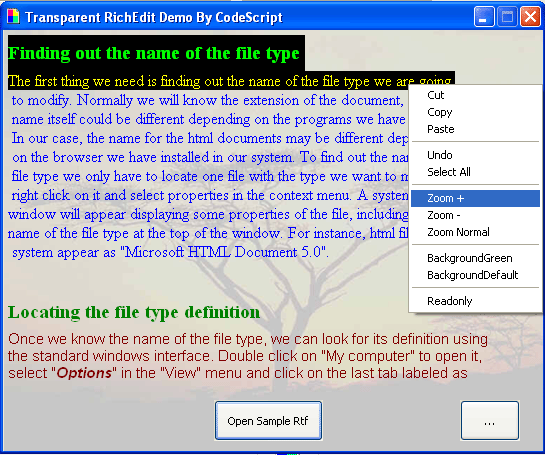
Try this:
http://codescript.vdsworld.com/VDS5src/TranparentRichedit.zip
You can modify the style of Richedit further as per your wish.
I hope this be possible in pure VDS after the update.
The dll may crash under XP/2k in VDS 5.x (it works VDS 3.x and above)
if that happens replace the dll mousedown with buggy VDS mousedown.
_________________
Regards
- CodeScript
Give your application a professional look with the VDSGUI Extension |
|
| Back to top |
|
|
Skit3000
Admin Team
Joined: 11 May 2002
Posts: 2166
Location: The Netherlands
|
|
| Back to top |
|
|
LiquidCode
Moderator Team
Joined: 05 Dec 2000
Posts: 1753
Location: Space and Time
|
| Posted: Tue Oct 28, 2003 8:04 pm Post subject: |
|
|
I posted that I couldn't get it to work....then it started to work.. Anyway, great job!!! Thanks much! I do hope that with the update this can be used without a dll.
Thanks again!!! 
_________________
Chris
Http://theblindhouse.com |
|
| Back to top |
|
|
LiquidCode
Moderator Team
Joined: 05 Dec 2000
Posts: 1753
Location: Space and Time
|
| Posted: Tue Oct 28, 2003 8:05 pm Post subject: |
|
|
It crashed. I have to reboot...
_________________
Chris
Http://theblindhouse.com |
|
| Back to top |
|
|
|
|
You cannot post new topics in this forum
You cannot reply to topics in this forum
You cannot edit your posts in this forum
You cannot delete your posts in this forum
You cannot vote in polls in this forum
You can attach files in this forum
You can download files in this forum
|
|

 FAQ
FAQ Search
 Memberlist
 Usergroups
 Register
 Profile
 Log in to check your private messages
 Log in


 @vdsworld